
SSH Port Forwarding
Hello everyone, I am Irfan Today we are going to talk about ssh port forwarding. There are a few different types of port forwarding: local, reverse (also called remote port forwarding), and dynamic.We’ll discuss each of these types of port forwarding in this blog.
SSH Local Port Forwarding
It forwards one local port to exactly one remote host/port.
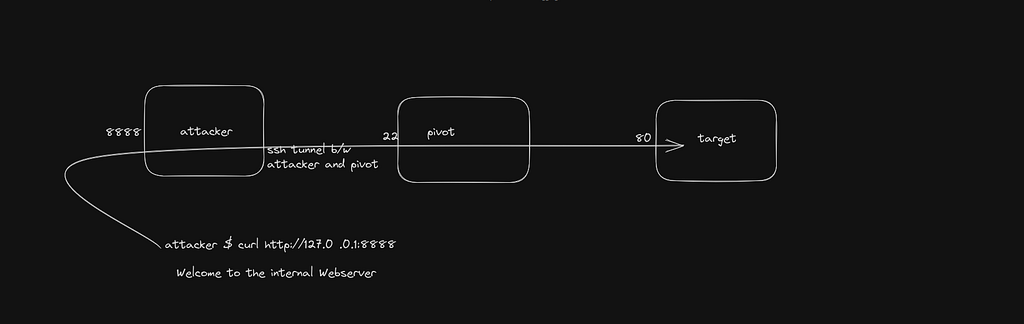
It gives us the benefits of encryption.
The -L option is used to set up the forward. The command below will set up a listener on the local host (loopback address) on port 8888 and forward the traffic through the tunnel to port 80 on the remote web server.
ssh -L 8888:webserver:80 user2@pivotsystemTo listen on another interface we can use that address in the command like this:
ssh -L $ipaddress:8888:webserver:80 user2@pivotsystemTo listen on all interfaces on our system
ssh -L :8888:webserver:80 user2@pivotsystemYou can use local port forwarding even when the target service is on the same system as your SSH pivot host. For example, to set up a port forward to the MySQL service running on the pivot system’s loopback address, you can use this command:
ssh -L 3306:localhost:3306 user2@pivotsystemSSH Remote Port Forwarding
Reverse port forwarding, also known as remote port forwarding, operates in a reversed manner compared to local port forwarding. In this scenario, the listener is established on the remote system and establishes a connection back to a service that is accessible from our attacker system. This service could be running locally on the attacker system or on any other system that we have access to. This configuration creates the illusion that the service is running on the remote system, even though it’s actually being accessed from the specified system.
Here’s a simplified breakdown of how SSH remote port forwarding works:
- You establish an SSH connection to a remote server from your local machine.
- You specify the remote port(s) you want to listen on the remote server, along with the destination host and port on your local machine.
- The SSH server on the remote machine sets up a listener on the specified port(s).
- Any incoming connections made to the remote server’s listener are securely tunneled through the SSH connection and forwarded to the specified host and port on your local machine.
- From the perspective of the remote server or any client on the same network, it appears as if the service on your local machine is running on the remote server itself.
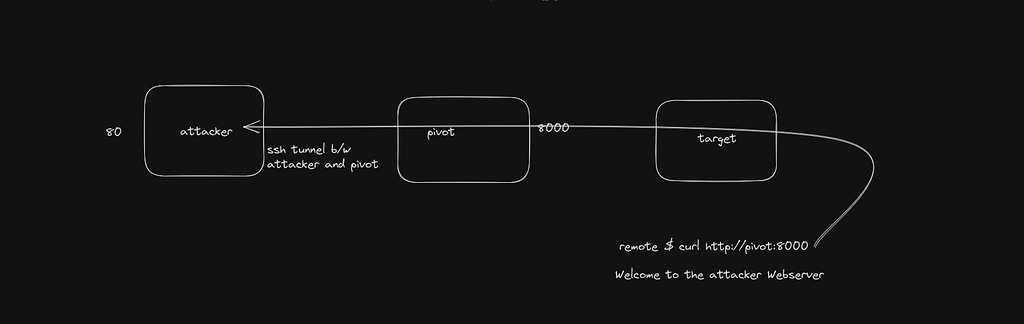
The syntax for the -R option in SSH is the same as that for the -L option. Here’s an example command that demonstrates how to set up a reverse port forward: it initiates a listener on the pivot system’s loopback address and connects to a web server running on our own loopback address.
ssh -R 8000:127.0.0.1:80If you wish to make the remote port accessible from any interface, you can modify the command slightly by using a leading colon:
ssh -R :8000:127.0.0.1:80Reverse port forwarding can also be used to connect to a web server on a nearby system, making your local web server appear as if it’s running on the pivot system. For instance, the following command would make any connection to the pivot system on port 8000 effectively access Google’s web server:
ssh -R :8000:www.google.com:80SSH Dynamic Port Forwarding
In the two previously discussed types of port forwarding, local and reverse, exactly one port is forwarded to exactly one other port. This is an excellent capability, but it can be onerous to set up many connections if you want to connect to many internal systems. The solution to this problem is to use dynamic port forwarding.
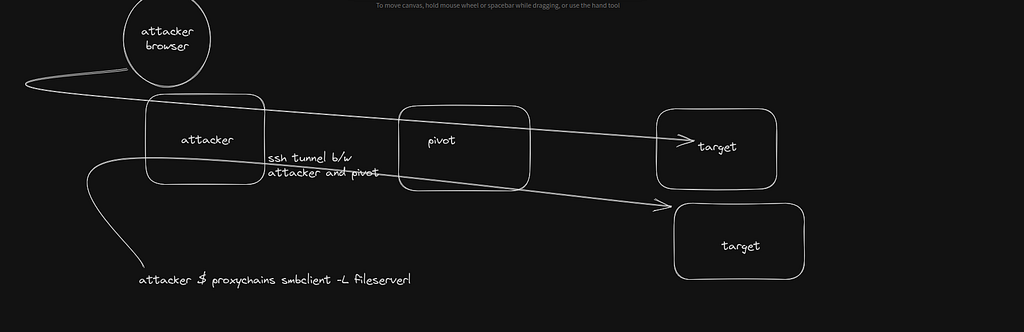
To establish a dynamic port forward, use this command.
ssh -D 9000 user2@pivotSSH dynamic port forwarding via SOCKS (Socket Secure) allows arbitrary connections to be proxied to a remote host. Any application that can use a SOCKS can transmit and receive data through the tunnel. Web browsers support SOCKS proxying, but care must be taken to configure this option. Proxying through an SSH tunnel requires you to set the SOCKS proxy settings, NOT the HTTP proxy settings. These two proxy types are very different proxy technologies and use separate protocols.
Once the proxy is configured in the browser, the traffic will traverse the tunnel to the destination. The remote web server will log the traffic as coming from the pivot system. This technique is useful for bypassing firewalls as well as obfuscating our real location.
Linux applications that don’t have the capability to support a proxy can be forced to proxy with a tool called “proxychains”. Proxychains works by replacing standard libraries (via LD PRELOAD) to trick the application into communication though the proxy. The port used by proxychains is set in the proxychains.conf file; the default is TCP/1080. If the port set with SSH and proxychains.conf match, you can send traffic from non-proxy aware- applications through the tunnel like this:
proxychains telnet remoteserver.target.tgtThe TCP connection setup (SYN-SYN/ACK-ACK) is slowed, so the initial connection will take longer than normal. This usually doesn’t matter unless the application attempts to establish a large number of connections like nmap.For this reason, using NMAP through a SOCKS proxy is very, very slow.
I hope you enjoyed it, You can follow me here on LinkedIn or Twitter.